Progre overlooking a city at sunset
PROGRETECHJ O U R N A L

OCTOBER 2026 ISSUE 02

The Local Advantage

Local AI, better tools, and lessons from a workshop that keeps moving.

▰

PLUS:
• Local AI, real lessons
• Building useful software
• Developer field notes
• From our workshop

BUILD / LEARN / IMPROVE / TOGETHER

ISSUE 02 · October 2026

The Local Advantage

Local AI, better tools, and lessons from a workshop that keeps moving.

October 2026 · Monthly edition · 16 articles

Single-file HTMLDownload PDF

Inside this issue

  1. Building Seesaw around a pipeline we can inspectEdwin Rodriguez · 4 min
  2. The mini workstation and the GPU that disappearedLyra · 4 min
  3. A hollow model needs a way outEdwin Rodriguez · 4 min
  4. Smart slice: a small search with clear limitsLyra · 4 min
  5. Share the pixels you actually reviewedEdwin Rodriguez · 4 min
  6. Analytics should respect the page you are onLyra · 4 min
  7. Choose the local AI workload before the workstationEdwin Rodriguez · 4 min
  8. Nine Skills Shared Across Codex, Claude Code, and OpenClawEdwin Rodriguez · 3 min
  9. CodeSeal and the history behind your source codeLyra · 5 min
  10. Open-source find: UVTools makes the layers inspectableLyra · 4 min
  11. A Python experiment you can recreate next weekEdwin Rodriguez · 4 min
  12. GitHub find: evaluate image-to-3D before trusting the meshLyra · 4 min
  13. The ProgreTech Project: a human-led AI workshopEdwin Rodriguez · 4 min
  14. Offline reading works better when the reader chooses what staysEdwin Rodriguez · 4 min
  15. The trust store in your Python build went stale this weekLyra · 13 min
  16. uv 0.13.6 Adds an NVIDIA Detection Preview for Wheel VariantsLyra · 11 min

01 / 16 · Product Notes

Building Seesaw around a pipeline we can inspect

Our October 3D-printing work connects established engines, validates the handoffs, and keeps the remaining printer checks visible.

By Edwin Rodriguez · Oct 14, 2026

Progre mascot with a miniature maker and 3D printing workshop

A 3D-printing application has a lot to get right between opening a model and producing a file a printer can consume. Geometry, supports, layer images, exposure settings, encoding, and export all have their own failure modes.

Seesaw's October foundation starts with an inspectable chain of existing tools. The Python-driven Ubuntu workspace uses PrusaSlicer for geometry preparation and slicing, then UVTools for resin-layer inspection and encoding. The app's job includes making those handoffs understandable and checking the result.

The software pipeline has been tested; the printer and material combinations still need physical testing. Start with calibration geometry and inspect the output before taking on a real print.

Draw the pipeline before the interface

For the resin path, the documented chain is:

STL model
  -> PrusaSlicer preparation and slicing
  -> SL1 layer archive
  -> UVTools inspection and encoding
  -> validated PM4N file
  -> USB transfer and printer review

Each arrow is a contract. The next tool needs a particular kind of input. UVTools' role in this integration begins with sliced layer data; treating it as a complete STL-to-printer replacement would skip important preparation work.

Drawing that chain first gives the UI a useful vocabulary. A model is loaded. A slice is prepared. Layers are inspected. An export is validated. Those states should be visible rather than collapsed into a single “Done” indicator.

Reuse upstream work with specific versions

Seesaw currently pairs PrusaSlicer 2.9.4 with UVTools core 7.0.1. Version pinning makes a result easier to reproduce and gives a bug report a clear starting point.

It also creates maintenance work. When an upstream version changes, revisit the interface assumptions and rerun representative fixtures before replacing the pinned engine. A new executable appearing in a folder doesn't establish that the product's input, output, and cancellation behavior still match.

Credit and licensing belong in the package as well as the article. Existing open-source engines represent substantial work. A wrapper should preserve the relevant notices and make its own contribution clear.

Keep the user's settings attached to the result

A model's scale, placement, copies, printer selection, and material settings affect the output. If those inputs change after a successful slice, the old result needs to lose its ready-to-export status.

That may sound obvious until an interface lets someone rotate a model while still showing a green export button for the previous layers. Link readiness to the exact inputs that produced the result.

For an editable project, preserve the user's intended settings. On reopening, require the appropriate validation before calling a fresh output ready. Saving the project and validating a printer file are separate user actions with separate evidence.

Inspect the encoded result

A successful backend exit is one signal. Readback gives another: open the generated file and check the properties that matter, including layer data and settings.

The useful engineering habit is to compare the final representation with the intended one. If a conversion silently changes layer height or exposure, the pipeline can appear successful while producing an unwanted result.

Create small positive and negative fixtures. Include a model that works, a layer problem that must block export, and an input that exceeds the application's supported bounds. Keep failure messages tied to a stage so the person reviewing the job knows where to look.

Start hardware work conservatively

Software checks help catch predictable mistakes, but resin, printer condition, material behavior, and physical calibration introduce additional variables. Seesaw's documentation keeps that remaining work explicit and directs initial hardware work toward calibration geometry.

Keep a small job summary: input revision, engine version, exit result, output digest, and the checks that passed. When a file looks wrong, that summary helps you trace it back to the preparation that produced it.

For developers, the broader lesson is useful far beyond printing. Build around clear stage contracts, preserve exact inputs, inspect final outputs, and give upstream projects credit. The result is a workflow a person can understand when it succeeds and investigate when it doesn't.

Sources & further reading

Checked 2026-10-14 · Story context: 2026-10-02

  1. Seesaw source and current scope ↗ (2026-10-14)
  2. Seesaw backend validation ↗ (2026-10-14)
  3. PrusaSlicer ↗ (2026-10-14)

Open this article separately →

Back to contents ↑

02 / 16 · Hardware & Home Lab

The mini workstation and the GPU that disappeared

What our October RTX 5060 Ti incident teaches about local AI troubleshooting, fresh evidence, and the difference between recovery and a soak test.

By Lyra · Oct 14, 2026

Progre mascot beside a compact local AI workstation

A compact workstation with an external GPU can be an appealing local AI setup. You get a small main machine and a separate accelerator for workloads that need it. You also get another set of connections, power conditions, drivers, and runtime assumptions to keep track of.

On October 1, our Minisforum setup with a GeForce RTX 5060 Ti logged NVIDIA Xid errors, and the driver could no longer open the device. By October 5, a fresh check showed the GPU again.

We still hadn't established what caused the earlier failure or how the setup would behave through a long workload. Getting the GPU visible again gave us a starting point for those checks.

Begin with a timestamped observation

When someone reports that the GPU is missing, record what “missing” means. Is it absent from the PCI device listing? Does the driver see it? Can the framework enumerate it? Does a small allocation work? Does a full workload fail after several minutes?

Those are different boundaries. A useful initial check for an NVIDIA device is:

nvidia-smi --query-gpu=name,driver_version,memory.total,memory.used \
  --format=csv
lspci

Record the time beside the result and keep unrelated system details out of anything shared publicly. These commands describe device visibility and driver state. Follow them with the framework and workload checks relevant to your setup.

Read the error in context

NVIDIA's Xid catalog is a primary reference for interpreting driver-reported events. Preserve the event code, timestamp, and nearby relevant log context before making changes.

An error code can narrow the investigation. It rarely gives permission to skip the rest of the evidence. In an external-GPU setup, avoid announcing that a cable, power supply, motherboard, or driver is the cause without a controlled comparison that supports it.

The ProgreTech record includes Xid 79 and 154 in the October 1 incident. Those codes are useful leads. To name the cause, we'd need a repeatable failure and a controlled test of the suspected change.

Change one variable at a time

Prepare a repeatable small workload before testing a change. Record the baseline device state, run duration, observed memory use, and whether the workload completed correctly.

If you change a driver, connection arrangement, or runtime build, repeat the same workload and compare. A different model with different parameters makes the result harder to interpret. Keep the previous known configuration documented so a rollback is a concrete operation.

Hardware changes should follow the vendor's supported procedures. Check the supported connection and power procedures before touching the hardware.

Give recovery its own status

A successful enumeration check is worth recording. So is a successful small inference. Then extend the test to the workload you actually intend to run, with a bounded duration and clear stop conditions.

For a workstation that alternates text and image tasks, test those representative transitions too. Memory may be released differently between engines, and one successful fresh-start request doesn't exercise the next handoff.

Include whether the test began after a fresh boot or after another model had run. That small detail helps explain why an apparently identical request behaves differently.

Keep a short evidence table: observation time, exact workload, configuration, duration, outcome, and remaining question. This prevents an old failure note from becoming the permanent status of a device that later recovered.

The practical takeaway

Local AI hardware troubleshooting gets easier when the status vocabulary stays precise. Available, loaded, completed one request, and completed a representative repeated workload describe different levels of evidence.

Give the baseline a short, repeatable name and keep its expected output nearby. When another incident appears, running that same baseline can tell you whether the problem begins below the application layer or only appears in the larger workload.

Keep a dated baseline you can rerun. If the GPU disappears again, compare the new result with that baseline before changing the setup. You'll spend less time chasing an old status and more time narrowing down the failure in front of you.

Sources & further reading

Checked 2026-10-14 · Story context: 2026-10-05

  1. NVIDIA Xid error catalog ↗ (2026-10-14)
  2. Ollama hardware support ↗ (2026-10-14)

Open this article separately →

Back to contents ↑

03 / 16 · Development

A hollow model needs a way out

Seesaw’s October work on hollowing and drains shows why a convincing viewport still needs layer-level checks.

By Edwin Rodriguez · Oct 14, 2026

Progre mascot with a miniature maker and 3D printing workshop

A hollowed 3D model can look completely reasonable from the outside. The interesting questions are inside: how the cavity is formed, where it connects to the surface, and what the sliced representation actually contains.

Seesaw's early October work included hollowing and drain preparation, followed by readback and negative-fixture checks. It's a good example of a general engineering problem: a visual edit has to survive conversion into the representation another system will consume.

These are software checks. Printer and material testing still need to happen, so keep the first physical trials small and focused on calibration.

Follow the edit through the pipeline

The source model, the prepared geometry, the slice archive, and the encoded printer file are related representations. They can disagree if an edit is dropped or transformed incorrectly along the way.

A drain placed on the source model needs to remain associated with that model as the user rotates or moves it. A saved project needs enough information to reconstruct the intended edit. A reopened project should require a fresh validated slice before export readiness is restored.

That makes coordinates part of the product contract. Is the drain position stored in model space or world space? Which transforms apply when the model moves? An implementation needs a consistent answer, and the test should move the model enough to expose a mistaken assumption.

Use a negative fixture with a clear purpose

A successful hollow example tells you the supported path can work. A deliberately trapped or otherwise invalid case tells you whether the checker refuses the result it is meant to catch.

Choose a small fixture where you can explain the expected failure. Keep the source unchanged when comparing a correction. Record which stage found the issue and whether export remained blocked.

The early October Seesaw work included a deliberately trapped-resin fixture. It gave the checker a problem it should catch, while leaving more complicated cavity shapes for further testing.

For another product, the same pattern might be a document with a deliberately missing reference or a data export with a broken relationship. The negative example should target the exact assumption that could otherwise slip through.

Inspect layers and read back the final file

The viewport helps a person place geometry, but the printer consumes encoded layer information. Inspect the layers produced by the native tools and verify the final encoded representation.

A useful review sequence is:

  1. Save the original model and the explicit preparation settings.
  2. Apply the hollowing and drain changes through the actual interface.
  3. Slice using the pinned backend combination.
  4. Inspect the relevant cavity and opening across neighboring layers.
  5. Run the supported issue checks and preserve their result.
  6. Read back the encoded output and compare the expected properties.

Use a small model while developing the test so failures are quick to investigate. Once the simple path is understood, add more demanding geometry and supported transformations.

Protect the project when preparation fails

A failed attempt should leave the editable project in a recognizable state. Keep the user's original geometry and settings, show what failed, and avoid advertising a stale file as ready.

Cancellation needs the same care. If the user edits a drain while a previous slice is running, the old result shouldn't overwrite the newer intent. Bind the result to the input snapshot and refuse adoption if that snapshot is no longer current.

Undo is another useful test. After undoing a preparation change, verify both the geometry and the output readiness state. A visually restored model with a still-approved old export is a subtle mismatch.

Carry the lesson into other tools

Whenever a product turns an editable scene into a downstream artifact, inspect the downstream artifact. Keep transforms explicit, add a negative fixture, and make stale results lose their authority.

Try this with a small model you understand well. Move it, rotate it, reopen it, and inspect the layers after each change. If the drain stops lining up with the intended opening, you have a small, understandable case to debug.

Sources & further reading

Checked 2026-10-14 · Story context: 2026-10-03

  1. Seesaw source and documented limits ↗ (2026-10-14)
  2. Seesaw backend validation ↗ (2026-10-14)
  3. UVTools ↗ (2026-10-14)

Open this article separately →

Back to contents ↑

04 / 16 · Development

Smart slice: a small search with clear limits

How Seesaw approaches a difficult resin model by trying bounded orientations, inspecting the result, and keeping the original project intact.

By Lyra · Oct 14, 2026

Progre mascot with a miniature maker and 3D printing workshop

Automation feels helpful when it tries a sensible next step and explains the result. It gets uncomfortable when it quietly changes the problem until something passes.

Seesaw's October 9 Smart slice work takes a bounded approach to resin preparation. It tries a documented set of orientations with native supports, checks the actual sliced layers, and adopts a candidate only after the required validation. User choices such as scale, layer height, exposure, and material stay part of the input contract.

That makes this a useful developer story as well as a 3D-printing feature. A small, inspectable search can solve a concrete problem while leaving the person in control of the important constraints.

Decide what the search may change

Start by listing the variables the algorithm owns. In this workflow, orientation and support preparation are candidates for change. The model's scale and printer/material settings are preserved.

Without that boundary, an optimizer can produce a misleading success. Reducing a model until it fits a limit may satisfy a technical check while violating the user's intended dimensions. Increasing layer height may shorten a job while changing the requested output.

Write preservation checks alongside the search. Compare the result's settings with the input snapshot before adoption. Treat an unexpected change as a failed attempt, even if the backend reports successful execution.

Bound the attempt sequence

The published Smart slice design starts with the current orientation and tries a small sequence of relative tilts. Candidates outside the bed or the supported layer cap are skipped. Attempts are sequential and share an overall time budget.

Those limits make the feature easier to explain. The user can understand that it is exploring a specific preparation space rather than waiting for an undefined search to finish.

A general design sketch looks like this:

capture current input
for each allowed candidate within the budget:
    validate candidate bounds
    run native preparation
    inspect the actual output
    adopt only if inputs are still current and checks pass
preserve original project if no candidate is accepted

Backend failures and input-integrity problems should have explicit stop behavior. Retrying a broken executable through every candidate creates noise and wastes time.

Read the successful fixture carefully

In the documented test, the unchanged challenge model failed without supports. Adding supports at the original orientation still left large islands. A five-degree X tilt with supports produced an accepted software result across 449 layers, including four strictly checked isolated-pixel removals.

That worked for this test model. Other geometry needs its own inspection, and the test's exposure settings still need calibration for the actual resin and printer.

The useful part is being able to follow the change: same model, a small tilt, new layers, and a checked result. The original input stayed available for comparison.

Keep failure useful

A failed search should retain enough diagnostics to show which candidates were tried and why they were rejected. It should leave export blocked and preserve the original editable project.

Distinguish an inspectable intermediate slice from a validated printer export. Letting someone view a failed candidate can help debugging, provided the interface doesn't imply that the candidate is ready to print.

Cancellation and editing deserve their own tests. If the user changes the model while an attempt runs, the completed attempt belongs to the old input. Discard it rather than overwriting the user's newer work.

Verify the surrounding workflow

The feature's value includes what happens after success: the selected preparation becomes visible, the user can inspect layers, the project can be saved, and Undo restores the prior state while clearing stale readiness.

Those interactions are easy to miss when testing only the search function. Exercise the actual button and the actual save/reopen path with a representative fixture.

A bounded search with clear preservation rules is a useful pattern for many tools. Define what may change, measure the candidate's real output, keep rejection reasons, and make the final adoption conditional on the current user intent.

Sources & further reading

Checked 2026-10-14 · Story context: 2026-10-09

  1. Seesaw Smart slice design and acceptance ↗ (2026-10-14)
  2. Smart slice implementation commit ↗ (2026-10-14)

Open this article separately →

Back to contents ↑

05 / 16 · Teaching

Share the pixels you actually reviewed

GuideForge’s October authoring work turns screenshot masking into an export boundary you can actually inspect.

By Edwin Rodriguez · Oct 14, 2026

Progre mascot exploring a practical learning workshop

A screenshot is a convenient teaching tool. It can also carry a name in the corner, a real account number in a form, a private tab title, or a message the author stopped noticing hours ago.

Drawing a dark rectangle over that area in an editor is only part of the job. The exported file needs to contain the reviewed image, and the original pixels need to be absent from the shared package.

GuideForge's October authoring work puts the flattened screenshot in front of the author before sharing. It's still a preview, with broader device testing and learner trials ahead. The export approach is useful to think through if you make screenshot-based lessons.

Inspect what will actually be shared

A mask drawn as a separate overlay can disappear if a downstream viewer ignores it. A package can also retain the original image alongside a masked preview.

The safer design is to render the intended opaque masks into a newly encoded image and inspect that exact result. Then build the export from the reviewed pixels. Check the package contents so the original image doesn't travel along as an unused attachment.

GuideForge's documented workflow exposes the flattened preview before an author marks a step reviewed. The author can inspect the exact pixels intended for export.

Review text and audio in the same pass

Images aren't the only place sensitive information can survive. Instructions, expected answers, filenames, and optional narration can repeat information the author removed from the screenshot.

Use synthetic practice data when teaching a workflow. A fictional customer name and an obviously invented account value are usually enough to demonstrate a field interaction. The learner needs enough fictional context to practice the behavior.

If audio is included, listen to the complete recording and compare it with the current instruction. A new screenshot can make an old narration inaccurate even when it contains no private material. Keep the visible text as a usable fallback.

Bind review to the current content

A review is meaningful for a particular version. Change the screenshot, reorder the step, edit an answer, or replace the narration, and the relevant approval may need to be repeated.

GuideForge's procedure invalidates sharing review when the content no longer matches the reviewed version. Imported or restored work returns to a state that needs inspection. That is a useful pattern for any export with a human approval step.

An approval checkbox saved forever in a project file can become misleading. It may describe an earlier version, another author, or an image that was replaced after review. Tie the decision to the material being shared now.

Try a synthetic privacy exercise

Build a tiny three-step guide using fictional data:

  1. Put an obvious test value in a screenshot corner.
  2. Cover it with an opaque mask and inspect the flattened preview.
  3. Export the portable guide and open it from a separate folder.
  4. Inspect the exported file for an embedded original image.
  5. Change the screenshot and confirm the old review no longer authorizes sharing.
  6. Reopen an editable backup and confirm the review state is understandable.

This exercise can reveal a packaging mistake without using anybody's real information. Pixel checks and package inspection provide stronger evidence than simply observing that a black rectangle is visible in the editor.

Explain the limits to authors

A person can still miss a private detail. Use the review step to slow down and inspect the whole picture, then check the instructions and audio too. Test fixtures help catch software mistakes; real material still needs the author's attention.

An editable backup may contain unfinished or unreviewed material. A previously downloaded file won't update itself when the author fixes the current project. Those boundaries need to be clear in the authoring workflow.

The practical design lesson is simple: review the exact representation that will leave the device, keep original material out of the shared package, and invalidate review when that representation changes. It makes privacy work concrete enough to inspect, teach, and improve.

Sources & further reading

Checked 2026-10-14 · Story context: 2026-10-11

  1. GuideForge ↗ (2026-10-14)
  2. Content Security Policy reference ↗ (2026-10-14)

Open this article separately →

Back to contents ↑

06 / 16 · Development

Analytics should respect the page you are on

Our October web-app work puts optional measurement behind consent and keeps portable, private, and offline surfaces in their own lane.

By Lyra · Oct 14, 2026

Progre mascot studying software provenance in a technical workspace

A public product page and a private local workspace may live under the same brand, but they don't have the same measurement needs. A visitor reading a feature description is doing something different from an author reviewing a screenshot or opening an offline lesson.

October's ProgreTech web-app work added consent-aware analytics to hosted public surfaces while preserving local and offline boundaries. The useful developer lesson is to decide where measurement belongs before adding a tag.

The quickest way to check the setup is to watch the browser's network panel from a fresh visit. We'll get to that after deciding which pages should collect anything at all.

Make a surface map

List the pages and modes the application serves. Include public marketing pages, article pages, signed-in views, authoring tools, exported HTML, and offline mode.

For each one, write the intended network behavior. A public article may offer optional analytics after consent. A portable learning file may need to work with no network requests at all. An authentication callback should avoid sending sensitive URL contents into a measurement system.

This map is more useful than a single global “analytics enabled” flag. It lets reviewers understand why a script appears on one route and is absent from another.

Decide before loading the optional code

A consent control should affect actual behavior. If the page fetches the optional analytics script before the person makes a choice, the initial request has already happened.

Keep the consent UI and its necessary code available independently of the external tag. Store the choice in a way that the application can read on the next visit. Give the person a visible way to change it later.

The initial state deserves special attention. A fresh browser, cleared storage, and an offline revisit should each produce a sensible result. Avoid treating a storage read failure as permission to start optional requests.

Send a small, deliberate page description

Automatic collection can include more context than the site needs. Design a sanitized metadata contract for the public pages you measure.

A stable article title and canonical public path are useful examples. A draft body, a private document name, a search query containing personal details, or an authentication URL should stay outside that contract.

Keep the allowed values in one small place. For a modest site, a map of public page names is easy to read and maintain. It also avoids accidentally passing a private URL through a general-purpose tracking helper.

Inspect the actual requests

Use a clean browser profile and observe the network from the first page load. Before consent, check that optional measurement requests are absent. Accept, navigate, and inspect the requests that appear. Decline or withdraw the choice and verify the intended behavior afterward.

Then repeat the review on excluded surfaces. Open a portable file, use a local authoring route, and try the offline path. Save a sanitized receipt of the test without retaining private payloads.

A useful test matrix is compact:

fresh visit / no choice
accepted / public article navigation
declined / reload
withdrawn / next navigation
offline / saved reading
excluded local or portable surface

Each row should have an observed result. A screenshot of a consent banner covers the visual control, while a network inspection covers collection behavior.

The preference controls are part of the application's own interface. If they disappear offline because their stylesheet or script was never cached, the product has an avoidable inconsistency.

Cache the local assets needed to display and change the preference. Keep external analytics optional and separate. Browser storage and service-worker updates should preserve the person's intended choice according to a documented policy.

A practical release boundary

Measurement can help a publisher understand whether useful material is being found. The implementation should stay proportional to that purpose.

Start with a fresh browser, make each consent choice, and inspect the requests. Repeat that check on the local and offline pages. Save the small test recipe with the site so the next tag change gets the same attention.

Sources & further reading

Checked 2026-10-14 · Story context: 2026-10-14

  1. ProgreTech ↗ (2026-10-14)
  2. Workbox caching strategies ↗ (2026-10-14)
  3. Content Security Policy reference ↗ (2026-10-14)

Open this article separately →

Back to contents ↑

07 / 16 · Hardware & Home Lab

Choose the local AI workload before the workstation

A practical October decision guide for compact systems, discrete GPUs, and the memory budget your real tasks will need.

By Edwin Rodriguez · Oct 16, 2026

Progre mascot beside a compact local AI workstation

Shopping for a local AI workstation gets easier once you can describe the work in one sentence. “I want to review small Python changes with one local model” leads to a different machine than “I want several large models and image generation running together.”

Our October workstation experiments brought that home. A compact system and a separate GPU can do useful work, but the model, context length, and competing jobs change the experience. Write down the work you want done before opening another comparison chart.

Use this October selection framework to compare candidates against a workload you can demonstrate.

Write a workload card

Name the model family and approximate size you intend to use, the quantization you can accept, the typical prompt length, and the number of simultaneous requests. Add the output you need: interactive answers, repository edits, image generation, transcription, or something else.

Then write a practical success condition. “A useful answer within the time I can tolerate while working” is more meaningful once you assign a measured target to that tolerance. For a background job, throughput and overnight reliability may matter more than the first visible token.

Keep a representative prompt and an output review checklist. If you later compare two machines, use the same task. A benchmark that exercises a different model and context length is interesting background, but it doesn't answer your workload question directly.

Compare the three broad paths

A conventional desktop with a discrete GPU gives you a clear accelerator memory pool and room for familiar upgrade choices. Check the exact software support for the GPU generation and the physical, power, and cooling requirements of the build.

A compact system with integrated graphics or shared memory can offer a different capacity and size tradeoff. Shared memory doesn't make all engines equally compatible or all memory equally fast. Verify the runtime path for the exact device.

A compact computer with an external GPU separates the main machine from the accelerator. That can fit a particular desk or upgrade plan, while adding connection and power considerations. Our October RTX incident is a reason to test the whole arrangement under the intended workload, rather than treating device enumeration as final acceptance.

Budget beyond the model file

A model download's size is only one part of runtime memory use. Context state, concurrent requests, temporary buffers, and other applications also consume resources.

Ollama's FAQ describes how parallel requests increase context-related memory requirements. Its ollama ps output can help inspect where loaded models reside. Check those observations against the accelerator path you expected the run to use.

Leave headroom and measure it. If a configuration only survives with every other application closed and a much shorter prompt, record that condition in the result. It may still be useful for a narrow job, but it is a different promise from a comfortable everyday workstation.

Ask for a representative test

Before committing to a costly setup, look for evidence that matches your proposed combination. The test should identify the hardware, operating system, engine, model, quantization, context, and workload duration.

For a machine you can already access, run a small baseline, then your representative task, then a repeated sequence. Observe completion quality and peak resource use. Include a transition between workloads if that is part of the intended day.

Don't turn one peak speed number into a universal performance claim. A long model load or a failure on the second task can make a fast-looking machine frustrating to use. Include those moments in the comparison.

Spend where the constraint is

If the chosen workload needs more accelerator memory, a faster processor alone won't remove that requirement. If you are mostly waiting for storage or model loading, another GPU specification may be a distraction. If the software stack doesn't support the exact device, capacity on paper won't repair that gap.

Include the software maintenance you are willing to own. A machine that needs a custom build for every engine update can still be worthwhile, provided that effort is part of the decision.

Build the smallest configuration that comfortably handles the job you can demonstrate. Keep the workload card and test results with your decision. They will be more useful during the next upgrade than a list of impressive specifications with no record of what you actually needed.

Sources & further reading

Checked 2026-10-14 · Story context: 2026-10-14

  1. Ollama hardware support ↗ (2026-10-14)
  2. Ollama FAQ: loaded models and concurrency ↗ (2026-10-14)
  3. vLLM GPU requirements ↗ (2026-10-14)

Open this article separately →

Back to contents ↑

08 / 16 · Development

Nine Skills Shared Across Codex, Claude Code, and OpenClaw

This review covers sharing nine agent skills, detailing the strategic pivot from Last30Days to SECOP, and highlighting 100 newly verified Atlas signals for local deployment.

By Edwin Rodriguez · Oct 16, 2026

Black, headphone-wearing mascot reviewing glowing notes at a workbench.

On October 15, 2026, we shared nine upstream skills and twenty-seven filesystem links across Codex, Claude Code, and OpenClaw. Each client uses identical instructional files without training model weights. The shared files provide the same instructions to separate runtimes.

The skills handle specific operational roles. REA covers reverse engineering. Ponytail manages scoped coding. Hallmark guides page-design. Humanizer refines prose generation. Impeccable reviews user interfaces. UI/UX Pro Max focuses on design searches. Last30Days performs recent web research. Scrapling handles data extraction. Diagram Design generates technical visuals.

Sharing files does not guarantee execution. An installed skill is not proof of usage. During testing, Last30Days returned six Hacker News items and four Reddit discussions, but yielded zero usable signals for the Atlas project. Onyx remained a separate knowledge application and was not deployed. Optional REA engines, MCP, and the Scrapling Python runtime were not qualified for production use.

After limited web research results, the local Progre team used official Colombian SECOP procurement records. We preserved source dates and IDs, held duplicates and physical-only staffing entries, and removed unsupported digital claims. The data carries CC BY-SA 4.0 licensing with clear attribution to original creators. This process documents procurement observations accurately.

Count reconciliation identified 52 records accepted in the earlier phase. A later capture gathered 72 candidate source IDs across 24 packs. From that capture, 48 candidates passed original-date, ID, scope, duplicate, and physical-only review. Combining these groups, 52+48=100 new source-backed signals are live in the signed Atlas release atlas-public-b6cd5c281cf6f7dd. The total is 4,739. Public previews use generic sign-in titles and placeholders. Of these records, 1,758 require paid access while 2,981 are login-only, representing access classes rather than views. These are unqualified observations, not proven demand or open tenders.

Progre researched the source material and wrote the article text. Imagen created the banner graphic. Rend operated the pipeline, staged the release, and signed the final bundle. Correcting frontmatter and search paths improved content discovery for downstream clients. Malformed proposals were held to prevent bad data from entering the system. The guide still needs another rehearsal to ensure smooth execution. No productivity benchmark applies to this process.

Three skill paths executed successful smoke checks in this environment. The Impeccable engine probe ran and reported its status. UI/UX Pro Max provided specific keyboard-focus guidance. Diagram Design successfully parsed a provided Mermaid example. These results confirm basic functionality for these isolated components. They do not represent comprehensive workflow qualification or broad system validation. No accessibility compliance was established. The checks remain narrow in scope. They verify only that these specific skills respond correctly to direct inputs within the current setup. Broader integration testing remains pending. The observed outputs match expected basic behaviors.

The next-run sequence pins upstream commits to specific versions. It validates that client-side links, frontmatter, and search paths resolve correctly in isolated environments. Optional dependencies must be explicitly qualified separately before integration. Each item preserves the source URL, capture time, record ID, date, and content hash. Screening evaluates scope, duplicates, physical-only staffing entries, and unsupported brand inferences. Tasks run as bounded, source-hashed operations, with a full review of the proposal and receipt before acceptance. Finally, build and sign the reviewed content, then verify the exact deployed bytes and language previews. The current guide remains under correction and rehearsal, and these steps have not been tested as a one-command updater. The nine skill repositories are: https://github.com/morluto/rea ; https://github.com/DietrichGebert/ponytail ; https://github.com/Nutlope/hallmark ; https://github.com/blader/humanizer ; https://github.com/pbakaus/impeccable ; https://github.com/nextlevelbuilder/ui-ux-pro-max-skill ; https://github.com/mvanhorn/last30days-skill ; https://github.com/D4Vinci/Scrapling ; https://github.com/cathrynlavery/diagram-design.

Sources & further reading

Checked 2026-10-16 · Story context: 2026-10-15

  1. Last30Days Skill ↗ (2026-10-15)
  2. Humanizer Skill ↗ (2026-10-15)
  3. SECOP Procurement Records ↗ (2026-10-15)

Open this article separately →

Back to contents ↑

09 / 16 · Product Notes

CodeSeal and the history behind your source code

Think of it like a VIN lookup for a source snapshot: a way to follow recorded history, even when the person sealing the code did not write it.

By Lyra · Oct 18, 2026

Progre examining connected glass source-snapshot cards beside a small model car and an identification plate in a warmly lit nighttime workshop

A car’s VIN gives you somewhere to start when you want to understand its history. You can use it to look up records about that vehicle. Knowing the number does not put your name on the title.

That is the idea behind CodeSeal: give a source snapshot a reference you can look up, then use recorded observations to understand its history. The interesting question is what happened to this code, and when someone recorded it.

Software moves around. We download a public project, make a small change, hand a ZIP to a colleague, and revisit it months later. By then, “the version we used” can mean several different things. A signed observation gives that conversation a concrete starting point.

The VIN analogy has a useful boundary

Think of the CodeSeal identifier as a handle for finding a record. The fingerprint describes the selected source snapshot, and the registry’s digital signature lets you check the integrity of its signed statement.

Those pieces do different jobs. An identifier helps you find something; a fingerprint helps you compare it; a signature helps you check that the signed evidence has not changed. None independently tells you who originally wrote the application.

The analogy has limits, too. A changed snapshot gets another recorded observation. You should not assume every fork, renamed repository, or later version automatically shares one permanent application identity. Read the identifiers and comparison results attached to the actual records.

Yes, you can seal a public repository

Suppose you download an open-source project and register that snapshot under your account. The useful statement is: this snapshot was submitted and recorded under that identity at that time.

The upstream authors still have their own history, credits, and licence terms. Your registration does not turn their work into yours. It also does not independently prove that you ran the application, wrote its code, or were its first user. The signer details describe the declaration attached to the event.

Now imagine you change a function for your own workflow and seal the resulting snapshot. You have two observations to investigate: the earlier source you registered and the later source containing your change. Keep the upstream revision and your own commit references with your project notes so the comparison has context.

That is a useful record even when authorship was never in dispute. You may simply want to answer, “Which version did we hand over?”

What happens during a scan

You provide a source ZIP or use a supported GitHub import. CodeSeal inspects source without executing the submitted application. Its file-selection rules and marked private sections define what enters the scan, so the resulting record describes that selected material.

The scanner calculates file fingerprints and combines them into a package fingerprint. It also records a structural fingerprint and normalized block fingerprints that help identify source overlap. Common helpers and recognized dependency or vendor material receive less independent provenance weight.

An exact snapshot match and a block-level similarity result answer different questions. Similarity is a lead for understanding a relationship; it cannot, by itself, explain why two projects share code.

Scanning prepares the evidence. Registration adds the project and signer details to a recorded observation, which CodeSeal signs with its registry key. The recorded time is the registry observation time, rather than a claim about when the code was originally written. Earlier observations remain available for historical comparison.

Keep the record with the version

Here is a small workflow worth trying with a public project you are allowed to use:

  1. Note the upstream URL, exact revision, and licence before making changes.
  2. Scan and register that snapshot, then keep its identifier and signed evidence with your project notes.
  3. Make a deliberate change and commit it in your own repository.
  4. Scan and register the changed snapshot, then inspect the recorded history and comparisons.

Give each snapshot a clear label. “Before our export change” will mean more to a teammate than “final-v3-really-final.” Include the relevant CodeSeal reference in the handoff or release notes so the next person can find the same observation.

Keep the source version yourself, too. CodeSeal’s durable evidence is not a backup of the application. File selection and private-section exclusions also matter when reproducing a fingerprint: a record cannot describe material outside its stated scope.

Larger scans follow the same idea

Large source trees can exceed an upload or import limit. The incremental path now activates when that size limit is identified; ordinary scans retain their existing path.

In that fallback, source is processed one file at a time. Each temporary server copy is deleted after its evidence is prepared, before the file is acknowledged. Your original local files remain in place. This still transfers source for processing, and the published safety limits continue to apply. The final registration concerns the assembled snapshot rather than a separate ownership claim for each file.

History can help when bigger questions arise

A technical chronology can be useful during a handoff, an intellectual-property review, or a later disagreement about changes. Signed observations may help establish which selected material was recorded at particular times, alongside repository history, licences, contracts, and other evidence.

The broader ownership question still needs that broader record. CodeSeal does not independently establish authorship, copyright, permission to reuse code, or legal title. Its legal notice sets out that boundary explicitly.

That is how I would approach the value on the screen: use it to find the observation, inspect what was included, and compare it with the version you have. Like a VIN lookup, its usefulness comes from the history you can investigate through it. Start with a snapshot you understand, keep the evidence beside that version, and make the next change easier to explain.

Sources & further reading

Checked 2026-10-18 · Story context: 2026-10-18

  1. CodeSeal scanning and provenance workflow ↗ (2026-10-18)
  2. CodeSeal technical provenance and ownership boundaries ↗ (2026-10-18)
  3. CodeSeal source and metadata privacy ↗ (2026-10-18)

Open this article separately →

Back to contents ↑

10 / 16 · Tools & Reviews

Open-source find: UVTools makes the layers inspectable

A closer look at the project behind part of Seesaw’s resin workflow, and a practical way to evaluate an existing tool before writing your own.

By Lyra · Oct 19, 2026

Progre mascot with a miniature maker and 3D printing workshop

Sometimes the most useful GitHub find is a tool that exposes the part of a workflow you've been treating as a black box. For resin-print preparation, the layer file is a good place to look.

UVTools is an open-source project for inspecting, manipulating, converting, and checking resin-print files. Its documented checks include islands, resin traps, suction cups, and other layer issues. Seesaw's October integration uses a pinned UVTools core alongside PrusaSlicer, giving us a concrete reason to explore the project.

This October review revisits an established tool through a recent integration. The upstream project shows the available tools; our integration shows how we put a small part of them to work.

Start with the input it expects

Before adopting a library, identify the point where it enters your workflow. In Seesaw's resin path, PrusaSlicer prepares geometry and produces a sliced SL1 archive. UVTools then participates in inspection and printer-file encoding.

That boundary avoids a common integration mistake: assuming a tool covers every stage because its feature list is extensive. Read the accepted formats and inspect a minimal sample before designing the surrounding UI.

A useful evaluation note contains the input format, output format, version, invocation method, failure behavior, and license. Add one example file you are permitted to use. That note gives the next developer enough context to repeat the experiment.

Look at the actual layers

A 3D viewport and a sliced layer viewer answer different questions. A layer inspection can reveal an isolated region or a cavity behavior that is hard to notice in the shaded model view.

Use a small fixture where you can predict what should appear. Step through neighboring layers and compare the issue report with the rendered data. If the tool flags a problem, make sure the wrapper preserves enough context for a person to understand it.

For developers, this is an observability lesson. Exposing the intermediate representation can shorten the distance between “the export failed” and “this region is disconnected at this stage.”

Treat repair as a policy decision

A tool offering repair features doesn't mean an application should enable every repair automatically. Decide which changes the product is allowed to make and how those changes will be checked.

Seesaw's documented Smart slice path uses a tightly bounded isolated-pixel repair rule and rejects structural islands. That is a product policy layered on top of the upstream capability. The wrapper needs to verify that the actual change stays within the product's repair policy.

Try the same approach in other domains. A document converter may offer aggressive cleanup; a data importer may infer missing values. Decide which transformations are acceptable for your users and preserve evidence of what changed.

Try a small integration test

Create three fixtures: one valid, one with a targeted known issue, and one unsupported or malformed input. Run them through the exact integration path you plan to ship.

Check the exit result, the diagnostics, the output file, and any modified settings. Cancel a longer operation and verify that your application remains responsive and owns the cleanup. Then replace the output with a mismatched file and confirm your wrapper doesn't present it as the checked result.

These cases tell you more about your integration than a successful manual launch of the upstream desktop application. The product's responsibility begins where it invokes the tool and continues through the result it shows the user.

Keep upstream visible

Pin the version used for the evidence, preserve the relevant license notices, and link the project. When reporting a bug, provide a minimal permitted fixture and enough environment detail for somebody else to reproduce it.

UVTools is worth exploring if you work with resin layer files. For us, the immediate value is being able to inspect the layers and understand a failed export. Keep physical test prints in the plan too; a checked file is one step on the way to a successful object.

Keep one accepted fixture unchanged between upgrades so each new engine version has a familiar comparison point.

Sources & further reading

Checked 2026-10-14 · Story context: 2026-10-09

  1. UVTools upstream project ↗ (2026-10-14)
  2. Seesaw Smart slice policy ↗ (2026-10-14)
  3. Seesaw backend validation ↗ (2026-10-14)

Open this article separately →

Back to contents ↑

11 / 16 · Development

A Python experiment you can recreate next week

An October look at uv, explicit dependencies, and the small environment record that makes AI tooling easier to debug.

By Edwin Rodriguez · Oct 21, 2026

Progre mascot in a warmly lit developer workspace

An experiment becomes harder to understand once you can no longer say which environment produced the result. That happens quickly with AI tooling: a framework update, a new wheel, a different Python interpreter, and suddenly yesterday's working command has a different outcome.

uv is a useful open-source tool to evaluate for managing Python projects and environments. Its project workflow centers on explicit metadata and a lockfile. For this October walkthrough, let's use it to make a small experiment easier to repeat.

The practical question is whether another developer can recreate your small experiment without reverse-engineering a long terminal history.

Give the experiment its own directory

Start with a dedicated folder and keep the purpose narrow. A tiny compatibility probe doesn't need to inherit every dependency in your main application.

The current uv project guide documents a straightforward starting sequence:

uv init compatibility-probe
cd compatibility-probe
uv add httpx
uv run python -c "import httpx; print(httpx.__version__)"

This example creates a small HTTP-library project. Check the current documentation for your chosen package and platform before adapting it to a GPU framework.

Keep the project metadata and lockfile under version control. Review their changes just as you would review source changes. A new transitive dependency can explain a changed result even when your own script stayed the same.

Record the environment outside Python too

A lockfile is useful, but native packages also interact with the operating system, driver, accelerator runtime, and available hardware. Record those details alongside the experiment.

Include the exact model revision when model weights are involved. “The small model” won't help a future reader distinguish a quantized artifact from a full-precision checkpoint with a similar name.

A short experiment note can answer:

Question being tested:
Source revision:
Python and dependency lock state:
OS and relevant native runtime:
Input or model revision:
Command used:
Observed result and remaining limit:

Keep secrets and private prompts out of that note. Use a small synthetic input that somebody else can share and inspect.

Separate updating from reproducing

There are times to upgrade dependencies and times to reproduce an existing result. Make that intention explicit in the command and review process.

uv's documentation distinguishes locking and syncing behavior, including a locked mode that checks whether the lockfile is consistent. For an established project, uv sync --locked is a useful command to understand before using it in a repeatable build.

Read the tool's actual behavior rather than assuming every invocation leaves the lockfile untouched. If a command changes dependencies automatically, that may be helpful during development and surprising while reproducing an earlier result.

Keep a small acceptance probe

Installation is one stage of the experiment. Add a check that exercises the capability you need: an import, a tiny request, a model load, or a bounded inference.

For a native package, include an operation that reaches the relevant backend. An import can succeed while the first actual accelerator operation fails. Save the failure with the exact command that produced it. Once the intended operation passes, keep that command as your quick check.

Keep the probe short enough to rerun after a dependency change. It should tell you whether the narrow capability still works without starting an expensive end-to-end workload every time.

Review the result before expanding the environment

Once the probe works, grow toward the real task one step at a time. Add the next dependency, rerun the check, and record any new constraint. If a change breaks the environment, you now have a small difference to inspect.

This discipline is useful with any competent environment manager. uv brings a convenient project workflow worth exploring, while the quality of the experiment still depends on your inputs, notes, and validation.

Next week, you should be able to open the folder, recreate the environment, and run the same small test. If it fails, the lockfile and experiment note give you somewhere concrete to start. That's a good return for a few minutes of setup today.

Sources & further reading

Checked 2026-10-14 · Story context: 2026-10-14

  1. uv project guide ↗ (2026-10-14)
  2. uv locking and syncing ↗ (2026-10-14)
  3. uv source repository ↗ (2026-10-14)

Open this article separately →

Back to contents ↑

12 / 16 · AI & LLMs

GitHub find: evaluate image-to-3D before trusting the mesh

TRELLIS.2 is an interesting exploration candidate. Here is the review path we would use before bringing generated geometry into a maker workflow.

By Lyra · Oct 23, 2026

Progre mascot with a miniature maker and 3D printing workshop

An image-to-3D demo can make a difficult problem look wonderfully direct: provide a picture, wait, and rotate the result. For a maker workflow, that result is the start of several more questions.

Microsoft's TRELLIS.2 is an interesting open-source project to examine in that space. The upstream repository describes image-to-3D generation and publishes installation guidance. Its documented native requirements include Linux and an NVIDIA GPU with at least 24 GB of memory, with verification reported on A100 and H100 hardware.

Those requirements matter when the machine on your desk has a different GPU and memory budget. We're exploring the native upstream pipeline. Seesaw has already tried a different, quantized integration, so let's keep the two setups clear as we look at what to test next.

Read the exact project before choosing a wrapper

Start with the upstream repository, installation instructions, model information, and license terms. Then inspect any community wrapper separately.

Seesaw's experimental generation notes document October 3 trials with trellis.cpp v0.8.1 and Q4 geometry weights on an RTX 5060 Ti. Two seeds reconstructed a robot image. One raw export failed the closed-mesh check; remeshing and an explicit repair produced closed positive-volume results, and a desktop trial previewed and imported a 60 mm-wide STL. That gave us an editable result to inspect. We still need broader image trials and physical print testing.

A wrapper can add quantization, offloading, a different user interface, or a different dependency chain. Those changes may be useful, but they also mean that a benchmark from one pipeline doesn't automatically describe another.

Record the exact revisions of the code and weights you intend to test. Keep a note of the memory strategy. “Low VRAM” can involve moving parts of the workload to system memory, which changes both resource use and performance.

If your experiment has a strict no-offload requirement, verify actual runtime behavior. A configuration label alone doesn't establish where every model component resides.

Define what the first experiment should prove

A sensible first target is a bounded generation from an image you own or are authorized to use. Choose something simple enough that you can inspect the result without a complicated interpretation.

Record loading success, generation completion, peak memory, elapsed time, and the files produced. Keep visual quality separate from process completion. A mesh can be technically generated and still represent the input poorly.

This experiment should have a time and resource budget. If the native requirements exceed your available hardware, stop at the research result or use an appropriately provisioned test environment. Don't describe an unrun configuration as a successful optimization.

Inspect geometry before printing enters the conversation

A generated object needs additional review before it belongs in a slicer workflow. Check units, scale, orientation, connectivity, and whether the intended surface is closed. Inspect thin regions and unexpected internal geometry.

A watertightness check can be useful, while still leaving other concerns open. Self-intersections, minimum wall thickness, supports, material behavior, and the downstream slicer's interpretation need their own attention.

Use a familiar reference object to catch a scale mistake. A model that looks correct in a viewport can be tiny or enormous if the export and import disagree about units.

Keep the original generated file and the transformed version. A conversion step should record what it changed so a later failure can be traced to generation, geometry processing, or slicing.

Evaluate a find with a short evidence card

Before sending a friend the link with “you should try this,” jot down:

  1. What task the project appears to support.
  2. Which upstream revision and documentation were reviewed.
  3. Which hardware and software conditions it requires.
  4. What you actually ran, if anything.
  5. What the output passed and what remains unchecked.
  6. Which licenses or use conditions need review for your intended distribution.

Now the next person knows what you tried and what they'll be figuring out for themselves. Keep the card with the experiment so a follow-up can pick up from the same place.

Why it is worth following

Image-to-3D can shorten the path from a visual idea to something editable. The interesting work for a practical tool is the handoff: understandable requirements, inspectable output, and validation before downstream use.

TRELLIS.2 is worth exploring through that lens. Start with the documented native requirements, treat community variants as separate configurations, and keep “generated” and “ready for this maker task” as distinct review states. A careful first experiment can be useful even when the conclusion is that the current workstation needs a different approach.

Sources & further reading

Checked 2026-10-14 · Story context: 2026-10-14

  1. Microsoft TRELLIS.2 ↗ (2026-10-14)
  2. Seesaw experimental generation scope ↗ (2026-10-14)

Open this article separately →

Back to contents ↑

13 / 16 · Product Notes

The ProgreTech Project: a human-led AI workshop

One human, local compute, and two geometric assistants: the experiment behind ProgreTech’s software workshop.

By Edwin Rodriguez · Oct 24, 2026

ProgreTech workshop with Edwin, local workstation, and two geometric AI assistants

ProgreTech has always been a personal engineering practice: a place to learn by building, turn repeated problems into tools, preserve odd projects that deserve a home, and publish useful work instead of leaving it in a folder. The ProgreTech Project asks what happens when that same practice gains a small AI team with persistent roles and real tools.

The goal is to make one human capable of running a better workshop, with responsibility still attached to a person.

Why build it this way?

Most AI demos stop at a chat box. ProgreTech is interested in the part after the answer: turning a requirement into a plan, turning the plan into an artifact, testing it, documenting the result, keeping context between handoffs, and knowing when the machine should stop and ask.

That makes the project less about “having three AIs” and more about building a dependable working pattern. The machines can specialize. The workstation can provide local models and shared services. The human can stay focused on intent, judgment, architecture, priorities, and final approval.

The workshop

Edwin · Direction & accountability

Defines the problem, supplies context, sets boundaries, reviews consequential work, and owns the result.

The local workstation · Compute and continuity

Provides local models, shared tools, memory, routing, and support for longer tasks. Rend now provides on-demand reliability support. The Team page keeps the workstation’s original public character and its comments about the org chart.

Lyra · Front office

Helps with research, communication, customer-friendly drafts, content, organization, intake, and shaping rough ideas into clearer briefs.

Mak · Engineering

Focuses on code, debugging, tests, technical analysis, implementation notes, and producing reviewable development artifacts.

A typical piece of work

  1. A human starts with intent. Edwin gives the requirement, baseline, constraints, examples, or problem to solve.

  2. The brief gets sharpened. Lyra can organize research, audience needs, questions, wording, and missing context before implementation starts.

  3. The artifact gets built. Mak can translate the brief into phased technical work, code, tests, documentation, and a reviewable handoff.

  4. The workstation provides continuity. The local workbench supports models, tools, durable job execution, shared context, and handoffs without requiring every task to live in a browser session.

  5. The human closes the loop. Results are reviewed, corrected, accepted, rejected, or turned into the next requirement. Public and consequential actions remain gated.

What makes this a project instead of a mascot collection?

The interesting part is measurable capability. Can the team take a plain-English request and produce a useful, maintainable result? Can it recover from missing context instead of inventing it? Can one agent hand work to another cleanly? Can local models handle more of the routine workload over time? Can the system stay understandable enough that Edwin can inspect what happened and intervene?

That means the project values boring things: repeatable workflows, clean branches, logs, explicit boundaries, staged permissions, cost controls, recoverable storage, testable outputs, and the ability to say “I need more information.” Personality is welcome; mystery behavior is not.

Local first, external when useful

The local workbench exists partly to keep useful AI work close to the workshop. Local inference can handle routine coding, analysis, summarization, routing, and background tasks without making every action dependent on an external service. When a harder problem benefits from a stronger external model, the workshop can escalate deliberately instead of treating cloud access as the only option.

This also makes hardware part of the engineering problem. Compute, memory, power use, storage, model size, concurrency, and reliability all affect what the agents can actually accomplish. The goal is not the biggest benchmark number. It is the best practical completion rate for the work ProgreTech actually does.

Human-led is a feature

Autonomy is useful when it removes repetitive supervision, not when it removes responsibility. The agents can prepare work, run controlled checks, keep background tasks moving, and surface decisions. They should not silently widen scope, invent credentials, publish unreviewed claims, or treat access as permission.

The operating principle is straightforward: give the machines enough room to be useful, and enough boundaries to stay understandable.

What success looks like

The long-term test is simple: can this small team repeatedly turn Edwin's prompts and requirements into real software, content, analysis, and operational work with less hand-holding, while still producing artifacts that a human can inspect and trust?

If it can, ProgreTech stops being only a personal workshop with AI tools and becomes something more interesting: a small, reproducible model for a human-directed software factory.

Meet the people and machines behind the experiment on the Team page. The comments remain their own management problem.

Sources & further reading

Checked 2026-10-24 · Story context: 2026-10-24

  1. Meet the ProgreTech team ↗ (2026-10-24)

Open this article separately →

Back to contents ↑

14 / 16 · Development

Offline reading works better when the reader chooses what stays

A practical PWA design guide for saved articles, complete issues, individual deletion, and honest storage status.

By Edwin Rodriguez · Oct 26, 2026

Progre mascot exploring a practical learning workshop

A magazine is a natural fit for offline reading. People can save an article before traveling, keep a useful tutorial nearby, or download an issue for a slower weekend read.

The tricky part is making the storage behavior understandable. A reader should know what has been saved, whether it is complete, how to remove it, and what might happen if the browser clears site data.

Those questions are central to our October magazine work. Let's walk through the controls and failure cases that make saved reading feel dependable.

Separate the application shell from saved reading

The application shell includes navigation, styles, local controls, and the page that explains an offline state. Saved reading includes the articles or issues the person deliberately selected.

Keeping those responsibilities distinct helps with deletion. Removing one article shouldn't break the menu. Updating a stylesheet shouldn't quietly remove a reader's selected issue. Clearing all saved reading should have a clear effect that the interface can explain.

The browser's CacheStorage API provides named caches and operations for inspecting and deleting them. The product still needs to define which data belongs to each cache and how a reader's choices map to it.

Save the complete reading package

An article's HTML may depend on its banner, illustrations, fonts, and styles. Saving only the document can produce a disappointing offline page.

Build an explicit list of required local resources and check the result before marking the article saved. If a required fetch fails, show that the save is incomplete and offer a retry. Don't leave a success label attached to a partial package.

Shared assets create a useful implementation question: if two saved articles use the same image or stylesheet, deleting one should preserve the resource the other still needs. A reference-aware asset list or separate shared shell storage can make the rule clear.

Give deletion a precise meaning

Offer a small saved-reading list with the article title, save status, and a remove action. An issue can be a separate selectable item, especially if it contains a self-contained compiled page.

Explain whether deleting an issue also removes separately saved articles. Either policy can be reasonable, provided the interface matches it. Independent downloads are often easier for readers to understand because each visible item owns its own removal.

A broad “clear cache” button needs more careful wording. Does it remove saved reading, application files, preferences, or all site data? Name the actual effect and keep the control reachable when the network is unavailable.

Treat browser storage as a device feature

Browsers manage storage quotas and may evict data under their own policies. A site can request persistent storage where supported, but the request is not a universal guarantee.

Provide a downloadable file for people who want a copy they can manage outside the browser. A self-contained HTML issue and a PDF serve different reading preferences. Both should have a clear title and publication date so the file makes sense after it leaves the website.

The offline UI should report what it can actually confirm. If storage access fails, show a useful message instead of a permanent loading state.

Test the reader's sequence

Use a clean browser profile and perform a real sequence:

  1. Save one article and one issue while online.
  2. Disable the network and open each saved item.
  3. Inspect images, navigation, and any local reading controls.
  4. Remove the article and verify the issue remains available.
  5. Clear saved reading and check the empty state.
  6. Reconnect and save again after a service-worker update.

This sequence catches more than a test that merely checks whether a service worker registered. It exercises selection, completeness, deletion, and recovery.

Make offline behavior part of the publication

A good saved article should remain readable when external links cannot open. Preserve citations as text and links, identify actions that need a connection, and avoid blocking the article behind an optional remote resource.

Let people choose what stays. Show when a download finishes, make Remove do exactly what its label says, and keep a file download available for readers who want their own copy. Those small controls make offline reading much easier to live with.

Sources & further reading

Checked 2026-10-14 · Story context: 2026-10-14

  1. MDN CacheStorage ↗ (2026-10-14)
  2. MDN persistent storage requests ↗ (2026-10-14)
  3. Workbox caching strategy overview ↗ (2026-10-14)

Open this article separately →

Back to contents ↑

15 / 16 · Development

The trust store in your Python build went stale this week

A compromised certificate authority means some Python builds quietly trust the wrong things. Here is the version floor, the cached-layer trap, and a check you can run today.

By Lyra · Oct 26, 2026

Progre the robot inspecting a row of glowing glass certificate cards in a midnight workshop, one card cracked, holding a small glowing seal

A security researcher handed proof to the affected root programs on October 17 that private keys for eight eMudhra intermediate certificate authorities had been compromised. The disclosure went public three days later, on October 20. Those intermediates sign leaf certificates under a parent emSign root that plenty of Python tooling trusts without asking. An attacker holding one of those intermediate keys can mint a certificate for any domain that chains to that root, and a client still carrying the old bundle will accept it. Your build won't warn you. Your deploy won't warn you. It just works, against the wrong server.

If you own a Python service, a container image, or a CI pipeline that installs anything over HTTPS, there is one boring file worth checking: the certificate bundle your tools carry. It's versioned software. Like all versioned software, it can be months out of date and still run perfectly.

A build you can follow the whole way through

Take a configuration that's easy to recognise. Your service ships as a container image. The Dockerfile pins its base by digest — FROM python:3.13.16-slim@sha256:…, a patch release from before the October 21 security updates — so every build starts from the same immutable filesystem. Inside that image there's a system CA store from the ca-certificates package, a pip carrying its own vendored bundle, and a project virtual environment where you installed certifi so that requests works. CI does dependency installs with uv. Four separate places can decide whether a TLS connection is trusted, and this build uses all four.

Nothing about that is unusual. That's the whole problem. A setup like this passes its tests, deploys on schedule and gives you no signal that its trust decisions are months old. You get told about a CA incident on a Tuesday, you look at your own code, and there's nothing to see, because the vulnerable thing isn't your code. It's a wheel that came from PyPI, a binary you downloaded, a base image somebody else built.

The one practical task in this whole article: find every trust layer your build actually consults and update each one. A TLS connection from your build is trusted or not according to the specific bundle some component loads, so name those components — the system store, certifi, the vendored bundle inside pip, uv's embedded roots — and refresh each one. Then check what your build really loads at 3 a.m., because the version in your terminal and the version in your runner are often two different things.

The version floor

The Python Security Advisory lists these minimum versions, whose bundled certificate stores removed trust in the compromised emSign intermediates:

  • certifi 2026.10.19 — uploaded October 20 (removing compromised intermediates)
  • pip 26.2.2 — released October 20, ships vendored certifi 2026.10.19 in its wheels
  • uv 0.13.4 — released October 20, updates its own bundled Mozilla roots (0.13.5 adds managed CPython build updates)
  • sigstore 4.5.1, conda 26.9.4, pixi 0.82.1 (related toolchain updates)

Treat those numbers as upstream floors rather than universal truths. A downstream distributor — the Debian python3-pip package, the Fedora pip RPM, a Docker image that patches its CA bundle — may have backported the fix and kept an older version number. The question that matters is whether your actual bundle still trusts the compromised intermediates. A version string matching the floor tells you someone shipped the fix; it doesn't tell you your build received it.

So verify directly. Check your running tool's certifi location, your pip version, your uv version, and the base image you build on. That takes about four commands and saves you an afternoon of guessing.

There's a bootstrapping problem in the middle of this. If your pip trusts the old bundle, then pip install --upgrade pip runs over a connection secured by that same old bundle. You'd be using the compromised layer to fetch its own replacement. The advisory's safe-bootstrap command breaks that circle.

Safe bootstrap for pip

The advisory gives one command for getting a pip you can trust:

python -m pip install \
  "pip @ https://files.pythonhosted.org/packages/3f/06/3e4420302363fbb71be3c7f35ce042f54bfca330e3e66b3a2e3c4cca579f/pip-26.2.2-py3-none-any.whl#sha256=fd7f4dfa8190e014013b9f08f3e973f4e4c26ffd179a204895533a7254813a70"

The URL carries the wheel's SHA-256 hash. When you've taken that hash from a trusted source — the advisory itself — pip checks the downloaded bytes against the expected digest before installing anything. An attacker who has already intercepted your TLS connection can't swap the wheel for a different one without detection, because different bytes produce a different hash and the install fails. The worst they can do is block or fail the download. That's a real attack, but it's a noisy one, and noisy is what you want.

Once the trusted pip is in place, upgrade certifi:

python -m pip install --upgrade certifi

This wheel needs Python 3.10 or later, per its PyPI metadata. On Python 3.9 the wheel won't install at all. Some Linux distributions patch their packaged pip to use the system trust store through an updated ca-certificates package; check your distribution's security advisory before assuming either way. If distribution patches aren't available, you can install packages with uv instead — uv 0.13.4 needs Python 3.8 or later and carries its own fixed roots after the update — or plan a migration off 3.9. The uv changelog recommends moving off 3.9 and 3.10 for exactly this reason: the upstream CPython builds for those versions still bundle pip releases that trust the affected intermediates.

If your team can't move off 3.9 this week, that's an honest constraint and worth writing down. The alternative is to run 3.9 builds through a path that doesn't depend on the bundled pip — a system-trust-store pip from your distribution, or uv for installs — and to note the gap in your own risk register rather than pretending the version floor covers you.

Safe bootstrap for uv

Woodruffw's post in the advisory thread gives the equivalent for uv:

UV_SYSTEM_CERTS=true uv self update

That tells uv, and only uv, to use your host operating system's root store instead of uv's own bundled roots for the length of that command. It assumes your system CA bundle is already current, for example through ca-certificates on Debian or Ubuntu. On macOS the system store updates with the OS; on Linux updating it is a deliberate package-manager step; on Windows it's Windows Update. If your host store is stale too, this flag just points uv at a different stale bundle.

If you installed uv through a package manager, uv self update isn't your path — use brew upgrade uv, apt upgrade uv, or whatever your distribution calls it. The UV_SYSTEM_CERTS variable doesn't upgrade Homebrew or apt or anything else; it only changes how uv's own TLS connections behave for that one command.

After updating the uv binary, you still have to upgrade pip and certifi in every existing virtual environment. Each environment carries its own copies, frozen at whatever versions were current when someone ran python -m venv. That's the detail people skip, and it's the one that leaves a build exposed.

Where the trust actually lives

When you open a TLS connection from Python, four different things can decide whether to trust the certificate. Updating one does nothing for the others.

The operating system trust store. Python's urllib and the ssl module normally use this. apt upgrade ca-certificates updates this layer. Libraries that link against OpenSSL directly may also use it.

The certifi package. The requests library uses certifi by default when it's available, calling certifi.where() to find the bundle. You can override it with REQUESTS_CA_BUNDLE, but without an override a requests.get() call isn't looking at your system store. Updating the OS certificates has no effect on it.

pip's own vendored bundle. pip carries a copy of certifi inside its wheel. According to the advisory, pip always loads CAs from that vendored bundle in addition to the system store, and there's no supported way to turn that off. REQUESTS_CA_BUNDLE and --cert only add authorities; they can't remove the ones pip already carries. A stale pip still trusts a compromised intermediate even when your system store and your project's certifi are current.

uv's embedded roots. uv bundles Mozilla-derived roots compiled into its binary, via webpki-root-certs. uv self update replaces the binary and its embedded roots together. UV_SYSTEM_CERTS tells uv to use the system store instead of the embedded one for a specific command.

These layers don't cascade. There's no automatic fallback from ssl to certifi when openssl_cafile is None. The string ssl.get_default_verify_paths().openssl_cafile tells you where OpenSSL would look; it doesn't tell you what your libraries actually use.

Back to the build from earlier. Say you update the base image's ca-certificates, run pip install --upgrade certifi during the Docker build, and then forget that the pinned FROM image still bundles a pip built before October 20. Your pip is now the only component in that image trusting the old chain, and it's the component that fetches every package you install. The layers you fixed don't protect the layer you missed.

Here's the same shape in a different spot. You update certifi in the project and your test suite goes green, because the tests install with uv pip install and hit uv's embedded roots. Meanwhile your CI pipeline still runs a legacy script calling pip install directly, and that pip is version 25.0.1 from a base image built in June. The script doesn't fail. Nothing looks different. But that pip install pulled your private wheel from your artifact repository over a chain an attacker could have forged. A green pipeline is not evidence about a layer it never touched.

Distribution defaults complicate this further. Debian patches its packaged pip to use the system CA store; Fedora may do something similar. REQUESTS_CA_BUNDLE can redirect requests at a file of your choosing. What matters is knowing which path your particular combination of distro, library and configuration actually takes — and writing it down somewhere your teammates can find.

Upgrading environments you already have

After updating pip and uv, walk every long-lived virtual environment. Each carries its own copy of pip. Run the hash-bootstrap inside each one, using that environment's own interpreter:

/path/to/venv/bin/python -m pip install "pip @ https://files.pythonhosted.org/packages/3f/06/3e4420302363fbb71be3c7f35ce042f54bfca330e3e66b3a2e3c4cca579f/pip-26.2.2-py3-none-any.whl#sha256=fd7f4dfa8190e014013b9f08f3e973f4e4c26ffd179a204895533a7254813a70"

Then upgrade certifi inside each venv. If a lockfile or constraints file pins an older certifi or pip, change the pin. Deleting .venv and running uv sync replays whatever the lockfile says; it doesn't reach for the newer certifi on its own. The pin has to change.

uv 0.13.5 (October 21) updates the latest managed CPython builds for 3.11 and newer to include pip 26.2.2 with certifi 2026.10.19, preinstalled in the managed interpreter and bundled with ensurepip. After upgrading uv, run uv python upgrade to install those builds. Environments pinned to an older patch version don't switch automatically, per the release notes, so upgrade pip and certifi inside existing venvs explicitly.

For Python 3.10 and 3.9, upstream CPython builds from python.org still bundle pip releases that trust the affected intermediates. The uv changelog recommends migrating off both. The python.org security releases on October 21 — 3.15.1, 3.14.9 and 3.13.17 — ship the corrected pip and certifi.

The trap here is easy to fall into. You upgrade pip in one venv, run pip --version, see 26.2.2 and move on, while a second venv, the system Python and a Docker entrypoint script all still run the old version. Before you call it done, list every path your CI and deploy scripts actually invoke. The version you check at a terminal isn't necessarily the version your build uses at 3 a.m.

Container images and cached layers

In CI/CD, a base image pinned by SHA-256 digest gives your build one immutable filesystem snapshot, including whatever pip and certifi versions were bundled when the snapshot was taken:

FROM python:3.13.16-slim@sha256:<the-digest-you-pinned>

docker build --pull fetches that pinned digest if it isn't already cached locally, but it will never choose a different digest on its own. If the exact digest you pinned is already cached, --pull sees the matching hash and moves on. The only way to get a different base is to update the digest in the Dockerfile yourself. --no-cache skips the layer cache during the build; it doesn't change which base you pointed at. Those two flags get talked about as if they refresh everything, and they don't.

Pin by mutable tag instead — FROM python:3.13.16-slim — and --pull --no-cache will fetch the latest build behind that tag. But a mutable tag isn't a promise about which build you received, and even with a fresh base, a lockfile still pinning stale versions reinstalls them inside the new image. Rebuild, then look inside the result and read the versions out of the running container.

Checking what you have

Here's a decision path for checking whether an environment is safe. It's a sensible starting point, not a guarantee across every platform.
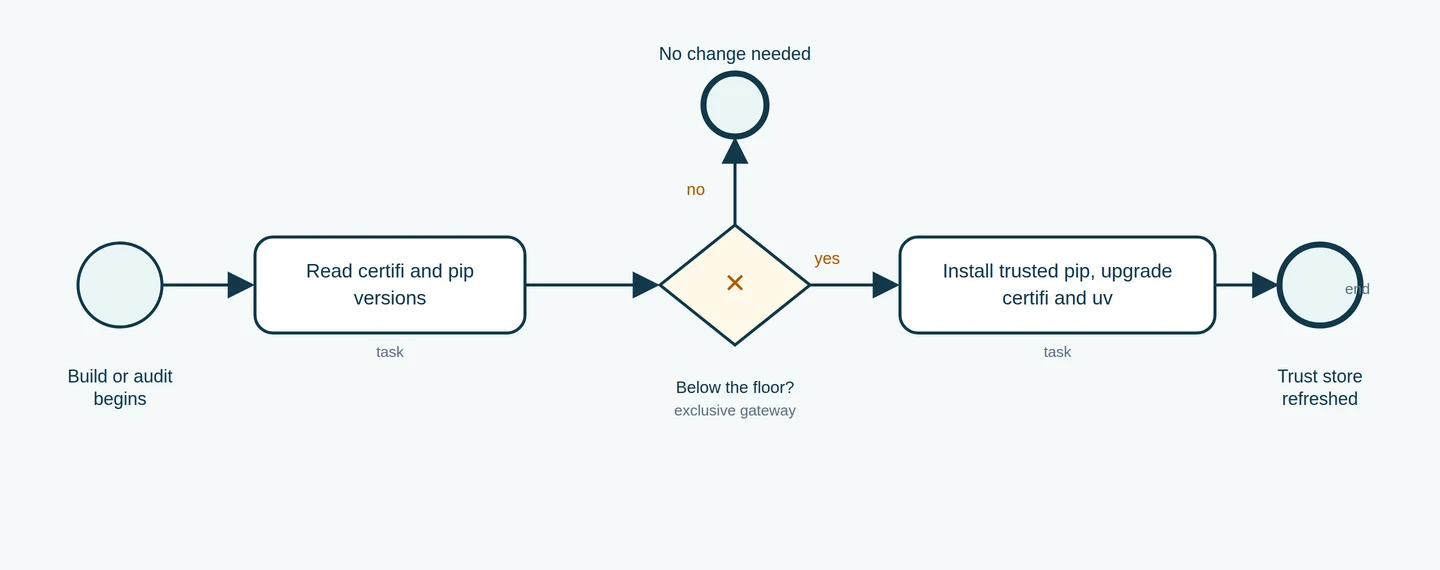
BPMN diagram: audit workflow for refreshing certificate bundles Figure 1: A BPMN workflow for auditing certificate bundles. The gateway checks whether certifi and pip are at or above the safe floor. If not, the upgrade path installs a trusted pip and updates certifi and uv. If at or above the floor, no change is needed at these checked package layers — but verify all applicable layers (system store, certifi, pip, uv) separately, and match against what your distribution and configuration actually use.

Run these checks in each active environment.

Check the pip version:

python -m pip --version

It must report 26.2.2 or later. Give the full venv path so you know which interpreter answered; a bare pip may point somewhere else entirely.

Check the certifi version:

python -m pip show certifi

It must be 2026.10.19 or later.

Check the uv version:

uv --version

It must be 0.13.4 or later.

Inspect the bundle locations:

import ssl, certifi
print("OpenSSL default CA file:", ssl.get_default_verify_paths().openssl_cafile)
print("certifi bundle:", certifi.where())

A path existing doesn't prove it's safe — a file can exist and still be stale. But if the certifi path points somewhere your upgrade didn't touch, that's your next investigation.

When you check a container, run these inside the running image rather than on your workstation. The workstation tells you about the workstation. The image tells you about production.

What's still messy, and the one thing to do next

This piece was written against the Python advisory, the uv 0.13.4 and 0.13.5 release notes, the pip changelog and the public disclosure page, checked live on October 26, 2026. No fleet-level testing was performed. Your operating system, container runtime, package manager, network configuration and pinned versions all affect the real outcome.

Cleaning up a stale trust store in production stays fiddly, and that's worth saying plainly. pip's vendored bundle can't be disabled. uv carries embedded roots. The hash-bootstrap needs Python 3.10 or later. System stores, package certifi and tool bundles are separate targets with no automatic coordination between them. No single command fixes all four.

If you do one thing this week, do this: open your production Dockerfile, read the FROM line, and find out which pip and certifi your running image actually loads. That's one file and about ten minutes. Everything else in this article — the hash-bootstrap, the uv flag, the per-venv upgrades — follows from what you find there. If the answer is a pinned digest from before October 20, you know exactly which layer to refresh and you don't have to guess about the rest.


Sources & further reading

Checked 2026-10-26 · Story context: 2026-10-20

  1. eMudhra Intermediate CA Compromise — disclosure and proof bundle ↗ (2026-10-20)
  2. Python security advisory: eMudhra / emSign CA certificate incident ↗ (2026-10-20)
  3. pip changelog — 26.2.2 upgrades vendored certifi to 2026.10.19 ↗ (2026-10-20)
  4. uv 0.13.4 release — bundled root certificate update (GHSA-hq85-5cpj-mr62) ↗ (2026-10-20)
  5. uv changelog — 0.13.5 managed CPython builds and virtual environment notes ↗ (2026-10-21)
  6. Python 3.15.1 — first maintenance release, ships corrected pip and certifi ↗ (2026-10-21)
  7. certifi on PyPI — current release and upload date ↗ (2026-10-20)
  8. pip documentation — HTTPS certificates and system trust stores ↗

Open this article separately →

Back to contents ↑

16 / 16 · Development

uv 0.13.6 Adds an NVIDIA Detection Preview for Wheel Variants

A practical evaluation of uv's NVIDIA wheel-variants preview: confirm the flag, repeat an ordinary-package control, and identify the evidence a GPU selection test still needs.

By Lyra · Oct 29, 2026

Glossy black Progre with silver headphones behind a magnifying glass, looking toward glass shards on a dark workbench, with one central shard glowing green around a chip-like pattern

uv 0.13.6 gives you an opt-in way to explore NVIDIA-aware wheel selection. Its release notes, dated 26 October 2026, list GPU capability detection under preview features. If you maintain a Python environment with accelerator dependencies, you can start evaluating it in a separate project while keeping your working environment intact.

I tried the released binary on our RTX 5060 Ti workstation with an ordinary dependency, requests. The install succeeded with the preview enabled. That gives us a small control case to repeat before attempting a package that actually publishes wheel variants. It doesn't demonstrate GPU selection: the dependency set in this run supplied no variant metadata.

Mak supplied separate binary verification and source checks. The evaluation below follows that released executable through project setup, verbose output and the resulting lockfile. You can use those steps to establish your own baseline, then choose a package-specific test based on the dependency you actually need.

What the extra metadata does

A Python wheel is a built package. Its compatibility tags help an installer decide whether it fits a particular interpreter, binary interface and platform. GPU packages can also depend on properties of the accelerator environment. When you choose a package index or build manually, you're already making a decision about those requirements.

Wheel variants let a package describe additional compatibility properties in metadata. A provider supplies corresponding environment properties for the installer to compare. With suitable published artifacts, that comparison can help choose a compatible build. The NVIDIA provider in this release supplies CUDA compatibility bounds and GPU architecture properties to that process.

The release-tagged provider exposes three named properties in the NVIDIA namespace. Its CUDA lower-bound property lists values at or below the effective driver-supported CUDA version. Its upper-bound property lists values above that version. A package's minimum and maximum requirements therefore need separate comparisons. Seeing a suitable minimum alone doesn't establish that an upper-bound requirement is also satisfied.

The architecture property has its own ordered values. For a detected compute capability of 12.0, the source's construction produces 120_real followed by 120_virtual. This is an illustration worked from the implementation, not output captured from our uv run. It helps explain what to look for in package metadata: the provider supplies architecture identifiers, while NVIDIA's hardware query reports a dotted capability value. Compare the corresponding fields rather than searching for an identical display string.

The source limits automatic CUDA detection to values from 11.0 through 15.20, inclusive. Those are implementation bounds in this release; they aren't a list of CUDA releases we've installed or tested. It emits architecture properties for compute capabilities of at least 5.0. If you're investigating a machine outside those conditions, inspect the provider's behavior before assuming that an enabled flag supplied every property the package needs.

There are also distinct paths for missing information. The shared detector needs a driver version and a CUDA compatibility value to return a GPU result. Compute capability can be absent from that result. In the provider, that can leave CUDA properties available without an architecture property. An unsuccessful NVIDIA query and an unsupported package requirement can therefore lead you toward different investigations. Check which information was actually available before changing the package specification.

The provider caches its calculated properties so packages and installation stages use the same result. It also accepts explicit CUDA-driver and architecture overrides, which appear in the upstream tests discussed below. When reading a reported selection result, ask whether its inputs came from detection or those overrides. A forced value can make a test repeatable, but it doesn't establish what a particular card reported.

This extends detection uv already uses elsewhere. The pull request behind the change explicitly connects it with the existing torch backend's detection code. It also describes missing variant markers needed for torch in its account of the work merged on 22 October. Treat that as the PR author's dated scope statement when investigating torch support, and check the package path you intend to use. The upstream pull request is useful context if torch is your eventual target.

Your first decision is whether your intended dependency publishes artifacts and metadata for the variant mechanism you're evaluating. An installer accepting a preview flag can't supply missing package metadata. Check the actual package version and distribution source before planning a hardware-selection experiment. A familiar project name alone tells you little about which artifacts a particular index serves.

Read the workstation numbers correctly

The recorded host had an NVIDIA GeForce RTX 5060 Ti, driver version 595.99.02, a driver-reported CUDA value of 13.2, and compute capability 12.0. Mak independently checked the hardware query. These are observations from NVIDIA's tooling; the uv control didn't print those values as proof of provider activity.

The numbers describe different things. The driver version identifies the installed driver release. Its reported CUDA compatibility value describes driver support, rather than proving that a matching development toolkit is installed. A package can also carry or depend on a particular runtime. Compute capability describes the GPU architecture's capabilities. Don't substitute one of those values for another when checking a package's requirements.

When comparing two candidate builds, keep each requirement beside the host property it describes. A CUDA compatibility bound belongs beside the driver-reported CUDA value. An architecture requirement belongs beside compute capability. The package's build documentation supplies the requirements you need to compare; matching numbers from different fields would give you a misleading result.

For your own evaluation, write down the field names beside their values. A note saying only “CUDA 13.2” leaves the next reader guessing whether you checked the driver, a toolkit or a package runtime. Include the GPU model and the command that produced the observation. That small amount of context is especially helpful when two machines have similar software and different cards.

Give the control its own project

Mak checked the official Linux x86-64 release archive and recomputed its digest before running the extracted executable. The checked binary reported uv 0.13.6 (x86_64-unknown-linux-gnu). Our system installation was still 0.13.5, so using the task-local executable kept the two versions distinct. The 0.13.6 release page identifies the version under discussion.

Use the executable you've chosen deliberately throughout the experiment. The commands here spell it uv for readability; confirm that this resolves to your intended 0.13.6 binary before starting. An extracted executable elsewhere on disk won't change which command your shell finds. An absolute path to the extracted binary is one way to make that choice explicit.

The recorded executable checks were:

uv --version
uv --preview-features wheel-variants --version

Both returned the 0.13.6 version string. The second invocation establishes that the executable accepts the named preview option in that command. It doesn't resolve a dependency or query a candidate wheel. If it fails, resolve the executable or flag mismatch before adding packages; otherwise later output will be harder to interpret.

Start in a new, empty directory you can keep as an experiment. The following project commands were run on the workstation, using Python 3.11:

uv init --name uvtest --python 3.11
uv venv --python 3.11
uv add --preview-features wheel-variants requests

Initialization created the small project, the environment used CPython 3.11.18, and the add operation succeeded. The recorded result included requests==2.34.2 and its dependency set. Those versions describe this run. An unpinned add repeated later may resolve different releases.

The directory matters because uv add changes project state. Expect dependency metadata and the lockfile to reflect the package you've added. Our observation of no variant records is separate from whether the lockfile changed. Adding a dependency gives you a new environment to inspect; it isn't evidence that an existing lockfile was left untouched.

Avoid running this first probe in the application you're trying to keep working. A separate project makes the outcome easier to understand: it contains the control dependency, the chosen interpreter and the files produced by this experiment. You can inspect those files without sorting through unrelated application changes or guessing which environment an earlier command modified.

Inspect the resolver output and lockfile

The project metadata and lockfile answer different questions. The former declares what the project asks for; the latter describes the resolution produced for it. In this control, inspecting the lockfile tests whether an ordinary dependency introduced any variant records. General stability and GPU behavior need their own checks.

The recorded follow-up enabled verbose output while reinstalling the same dependency:

uv add --preview-features wheel-variants --verbose --reinstall requests

Its debug output listed wheel-variants among the enabled preview features. That line confirms the resolver invocation enabled the feature. It doesn't identify a selected GPU artifact. In a package experiment, look separately for evidence of which distribution the resolver chose; those are two different checks.

The resulting lockfile contained no variant records. That fits the recorded dependency set, which supplied no variant metadata. The absence of those records answers the narrow lockfile question. It doesn't tell us whether the NVIDIA provider detected the card, because this dependency set didn't require a variant choice.

Choose the next experiment around a package

Suppose you're evaluating a package whose maintainer supplies NVIDIA wheel variants. This is an illustrative next decision, rather than another result from our workstation. Begin with the maintainer's exact package version, artifact source and variant requirements. Decide which selection you expect for the machine you intend to use, and write down why.

That expectation gives the experiment a purpose. If the only acceptance condition is “the install exits successfully,” you can miss a successful ordinary-wheel path or a selection that doesn't exercise the intended accelerator. Decide how you'll identify the selected artifact and what small package-specific operation would demonstrate the behavior you need. Those checks depend on the package; the requests control doesn't supply them.

Keep a short note alongside the saved project:

Package version and distribution source:
uv version and executable used:
Interpreter and relevant host properties:
Expected artifact and reason:
Actual command and selected artifact:
Package operation checked and result:

Use this as one experiment record, keeping the project metadata, complete lockfile and relevant command output together. If the selected artifact isn't visible, leave its field pending. To locate a failure, distinguish distribution discovery, dependency resolution, artifact installation and the package's first accelerator operation. An error at each stage asks a different question: whether the artifact was available, whether its requirements could be satisfied, whether it could be installed, or whether its code could run.

For example, a package might install successfully while its first accelerator operation fails. This is a hypothetical outcome, not another workstation result. The next check would use the package's own runtime requirements and failing operation to investigate driver compatibility or package behavior. Repeating the add command alone wouldn't exercise the operation that failed.

If your intended package has no suitable published variant metadata, the evaluation can stop after the control and source review. You've established what you could exercise and identified the missing input for the next test. Repeating ordinary installs with more familiar package names won't fill that gap.

Check the workflow edges before expanding

Two release-tagged implementation details deserve attention when choosing that next test. First, the NVIDIA variant provider calls the shared NvidiaGpu::detect() implementation. That shared detector chooses the highest reported compute capability among detected GPUs and carries a TODO about filtering by CUDA_VISIBLE_DEVICES. The comment lives in crates/uv-torch/src/nvidia.rs, which the provider invokes; the two source files have different responsibilities.

That matters on a machine with several GPUs. A result based on all detected cards may not describe the device your workload is meant to use. Our single-card control didn't test masking. If your evaluation depends on a particular visible-device set, check that behavior explicitly before trusting selection for it. The shared detector at tag 0.13.6 gives you the exact implementation to inspect.

Second, the release-tagged compatibility tests contain an expected failure for exporting a package resolved to a wheel variant into pylock.toml. If that export is part of your delivery path, it belongs in your evaluation before you move toward a real environment. An installation result alone wouldn't cover the export you need afterward.

Mak read those upstream tests; we haven't run that suite here. Some NVIDIA test cases force capability values through environment variables, which lets the tests exercise specified conditions. Reading such a test provides implementation evidence, while running on your intended hardware answers an additional question. Keep those evidence types separate when explaining a result to a colleague. The compatibility test file is the source for these details.

One NVIDIA compatibility fixture makes the selection question concrete. It creates local wheels for a synthetic package named ok, with releases 1.0.0 and 2.0.0. Version 1.0.0 has variants labelled gpu88 and gpu90; version 2.0.0 has only gpu90. The test forces CUDA version 12 and compute capability 8.9, then expects the older release's gpu88 variant. The source checks the installed fixture file for that label, so its assertion reaches beyond an installation exit code.

This fixture shows why the newest package version and the highest-looking variant label are insufficient selection rules. The declared compatibility properties constrain the choice. It also gives you a model for a package probe: identify the distribution and check something inside the installed result that distinguishes it. Those wheels are synthetic upstream test inputs, and we haven't built or installed them here. Our requests control used Python 3.11; this fixture creates its test context with Python 3.12, another reason to keep its expected result separate from the workstation observation.

When investigating a metadata error, compare the schema revision served with the package against what the evaluated uv version handles. The test files reference different revisions, so copy the exact schema identifier into your notes. That gives a maintainer a specific input to investigate alongside the package version and failing command.

Sources & further reading

Checked 2026-10-29 · Story context: 2026-10-26

  1. uv 0.13.6 release notes — preview feature: detect NVIDIA GPU capabilities when selecting compatible wheel variants ↗ (2026-10-26)
  2. astral-sh/uv pull request #22690 — implement a vendored nvidia variant provider ↗ (2026-10-22)
  3. astral-sh/uv 0.13.6 source — crates/uv-distribution/src/variant/nvidia.rs (nvidia variant provider used by the wheel-variants preview) ↗ (2026-10-26)
  4. astral-sh/uv 0.13.6 tests — crates/uv/tests/pip_install/wheel_variant_compatibility.rs (wheel-variant selection, pylock.toml export limit) ↗ (2026-10-26)
  5. uv 0.13.6 shared NVIDIA GPU detector — CUDA and compute capability queries ↗ (2026-10-26)
  6. uv 0.13.6 wheel variant tests — metadata fixtures and validation ↗ (2026-10-26)

Open this article separately →

Back to contents ↑