
Development · 2026-10
The trust store in your Python build went stale this week
A compromised certificate authority means some Python builds quietly trust the wrong things. Here is the version floor, the cached-layer trap, and a check you can run today.

Build
Learn
Improve
Together— Progre


A security researcher delivered proof to the affected root programs on October 17 that private keys for eight eMudhra intermediate certificate authorities had been compromised. The disclosure became public on October 20. Those intermediate CAs sign leaf certificates under a parent emSign root that a lot of Python tooling trusts by default. An attacker holding one of those intermediate keys could mint a certificate for any domain that chains to that root, and any client still carrying the old bundle would accept it. Your build would not warn you. Your deploy would not warn you. It would just work, against the wrong server.
If you own a Python service, a container image, or a CI pipeline that installs anything over HTTPS, you need to check one specific, boring file: the certificate bundle your tools carry around. It is versioned software like everything else. And like everything else, it can be out of date while still running.
The version floor
The Python Security Advisory lists these minimum versions whose bundled certificate stores removed trust in the compromised emSign intermediates:
certifi2026.10.19 — uploaded October 20 (removing compromised intermediates)pip26.2.2 — released October 20, ships vendoredcertifi2026.10.19 in wheelsuv0.13.4 — released October 20, updates its own bundled Mozilla roots (0.13.5 adds managed CPython build updates)sigstore4.5.1,conda26.9.4,pixi0.82.1 (related toolchain updates)
These are upstream floors. A downstream distributor — the Debian python3-pip package, the Fedora pip RPM, a Docker image that patches its CA bundle — may have backported the fix to an older version number. What matters is whether your actual bundle still trusts the compromised intermediates, not whether your version string matches the floor. The only way to know is to verify directly: check your running tool's certifi location, your pip version, your uv version, and the base image you are building on.
If your pip trusts the old bundle, pip install --upgrade pip runs over a connection secured by that same old bundle. The advisory's safe-bootstrap command breaks that circle.
Safe bootstrap: pip
The advisory gives one command for getting a pip you can trust:
python -m pip install \
  "pip @ https://files.pythonhosted.org/packages/3f/06/3e4420302363fbb71be3c7f35ce042f54bfca330e3e66b3a2e3c4cca579f/pip-26.2.2-py3-none-any.whl#sha256=fd7f4dfa8190e014013b9f08f3e973f4e4c26ffd179a204895533a7254813a70"
The URL carries the wheel's SHA-256 hash. When you have obtained that hash from a trusted source — the advisory itself — pip checks that the downloaded bytes match the expected digest before installing. An attacker who has already intercepted your TLS connection cannot swap the wheel for a different one without detection, because substituting different bytes would produce a different hash and the install would fail. The worst they can do is block or fail the download.
Once that trusted pip is in place, upgrade certifi:
python -m pip install --upgrade certifi
This pip wheel requires Python 3.10 or later, per its PyPI metadata. On Python 3.9, the wheel cannot install. Some Linux distributions patch their packaged pip to use the system trust store with an updated ca-certificates package; check your distribution's security advisory. If distribution patches are unavailable, use uv to install packages (uv 0.13.4 requires Python 3.8 or later and carries its own fixed roots after updating), or plan a migration off Python 3.9. The uv changelog recommends migrating off 3.9 and 3.10 for this reason; the upstream CPython builds for those versions still bundle pip releases that trust the affected intermediates.
Safe bootstrap: uv
Woodruffw's post in the advisory thread gives the equivalent for uv:
UV_SYSTEM_CERTS=true uv self update
This tells uv — and only uv — to use your host operating system's root certificate store rather than uv's own bundled roots for the duration of that command. It assumes your system's CA bundle is already up to date, e.g. via ca-certificates on Debian/Ubuntu. On macOS, system trust stores update automatically with the OS; on Linux, updating them is a deliberate package-manager step. On Windows, the system store is maintained by Windows Update.
If you installed uv through a package manager, uv self update is not the right path — use brew upgrade uv, apt upgrade uv, or your distribution's equivalent instead. The UV_SYSTEM_CERTS environment variable does not configure or upgrade Homebrew, apt, or any other package manager; it only affects how uv's own TLS connections behave.
After updating the uv binary, you still need to upgrade pip and certifi in every existing virtual environment, because those environments carry their own copies frozen at whatever versions were current when the venv was created.
Where the trust actually lives
When you open a TLS connection from Python, four different things can decide whether to trust the certificate, and updating one does nothing for the others.
The operating system trust store. Python's urllib and the ssl module normally use this. Running apt upgrade ca-certificates updates this layer. Libraries linking against OpenSSL directly may also use it.
The certifi package. The requests library uses certifi by default when it is available, calling certifi.where() to find its bundle. You can override this with REQUESTS_CA_BUNDLE, but without an override, a requests.get() call is not looking at your system store. Updating the OS certificates has no effect on it.
pip's own vendored bundle. pip carries a copy of certifi inside its wheel. According to the advisory, pip always loads CAs from that vendored bundle in addition to the system store, and there is no supported way to disable it. REQUESTS_CA_BUNDLE and --cert only add authorities; they cannot remove the ones pip already carries. A stale pip can still trust a compromised intermediate even if your system store and your project's certifi are current.
uv's embedded roots. uv bundles Mozilla-derived roots compiled into its binary (via webpki-root-certs). uv self update replaces the binary and its embedded roots. The UV_SYSTEM_CERTS env-var tells uv to use the system store instead of the embedded one for a specific command.
These layers do not cascade. There is no automatic fallback from ssl to certifi when openssl_cafile is None. The string ssl.get_default_verify_paths().openssl_cafile tells you where OpenSSL would look; it does not tell you what your Python libraries actually use.
A concrete example: you update your Debian base image's ca-certificates, run pip install --upgrade certifi in your Docker build, and forget that the FROM image still bundles pip 26.2.1. Your pip is now the only component that trusts the old chain — and it is the component that fetches every package. That is the gap the version floor addresses.
Here is another: you update certifi in a project and run your test suite. The tests pass because they install packages via uv pip install, which uses uv's embedded roots. But your CI pipeline also runs a legacy script that calls pip install directly, and that pip is still version 25.0.1 from a months-old base image. The script does not fail. Nothing looks different. But the pip invocation that downloaded your private wheel from your artifact repository trusted a chain that an attacker could have forged. The layers that are fine do not protect the layer that is not.
On some distributions, these defaults are configured differently. Debian patches its packaged pip to use the system CA store. Fedora may do similar things. REQUESTS_CA_BUNDLE can redirect requests to a specific file of your choosing. What matters is knowing which path your specific combination of distro, library, and configuration actually takes.
Upgrading existing environments
After updating pip and uv, walk every long-lived virtual environment. Each one carries its own copy of pip. The hash-bootstrap command must be run inside each environment, using that environment's Python:
/path/to/venv/bin/python -m pip install "pip @ https://files.pythonhosted.org/packages/3f/06/3e4420302363fbb71be3c7f35ce042f54bfca330e3e66b3a2e3c4cca579f/pip-26.2.2-py3-none-any.whl#sha256=fd7f4dfa8190e014013b9f08f3e973f4e4c26ffd179a204895533a7254813a70"
Then upgrade certifi inside each venv. If your lockfile or constraints file pins an older version of certifi or pip, update the pin. Deleting .venv and running uv sync replays whatever version the lockfile pins — it does not automatically pick up the newer certifi. The pin must change.
The uv 0.13.5 release (October 21) updates the latest managed CPython builds for Python 3.11 and newer to include pip 26.2.2 with certifi 2026.10.19, both preinstalled in the managed interpreter and bundled with ensurepip. After upgrading uv, run uv python upgrade to install these updated builds. Virtual environments pinned to an older Python patch version do not switch automatically, per the release notes. Upgrade pip and certifi inside existing venvs explicitly.
For Python 3.10 and 3.9, upstream CPython builds from python.org still bundle pip releases that trust the affected intermediates. The uv changelog recommends migrating off those versions. The python.org security releases (3.15.1, 3.14.9, 3.13.17, all 2026-10-21) ship the corrected pip and certifi.
One practical trap: it is easy to upgrade pip in a venv, run pip --version, see 26.2.2, and assume the job is done — while a second venv, a system Python, or a Docker entrypoint script is still running the old version. Before you move on, check every path your CI and deploy scripts actually invoke. The version you use at a terminal is not necessarily the version your build uses at 3 a.m.
Container images
In CI/CD, if your Dockerfile pins a base image by SHA-256 digest, your build references one immutable filesystem snapshot — including whatever pip and certifi versions were bundled when it was taken:
FROM python:3.15.1-slim@sha256:abc123...
docker build --pull will fetch the pinned digest if it is not already cached locally, but it will never select a different digest on its own. If the exact digest you pinned is already cached, --pull sees the matching hash and moves on. The only way to get a different base is to update the digest in your Dockerfile yourself. --no-cache skips the layer cache during the build but does not change which base you pointed at.
If you pin by mutable tag (FROM python:3.15.1-slim), then --pull --no-cache fetches the latest version of that tag — but a mutable tag is not a guarantee of which build you received. And even with a fresh base, if your lockfile still pins stale versions, the container reinstalls them inside the new image. After rebuilding, check what the image actually contains.
Verifying your setup
Here is a decision workflow for checking whether your environment is safe. It is a sensible starting point, not a guarantee across every platform and configuration.
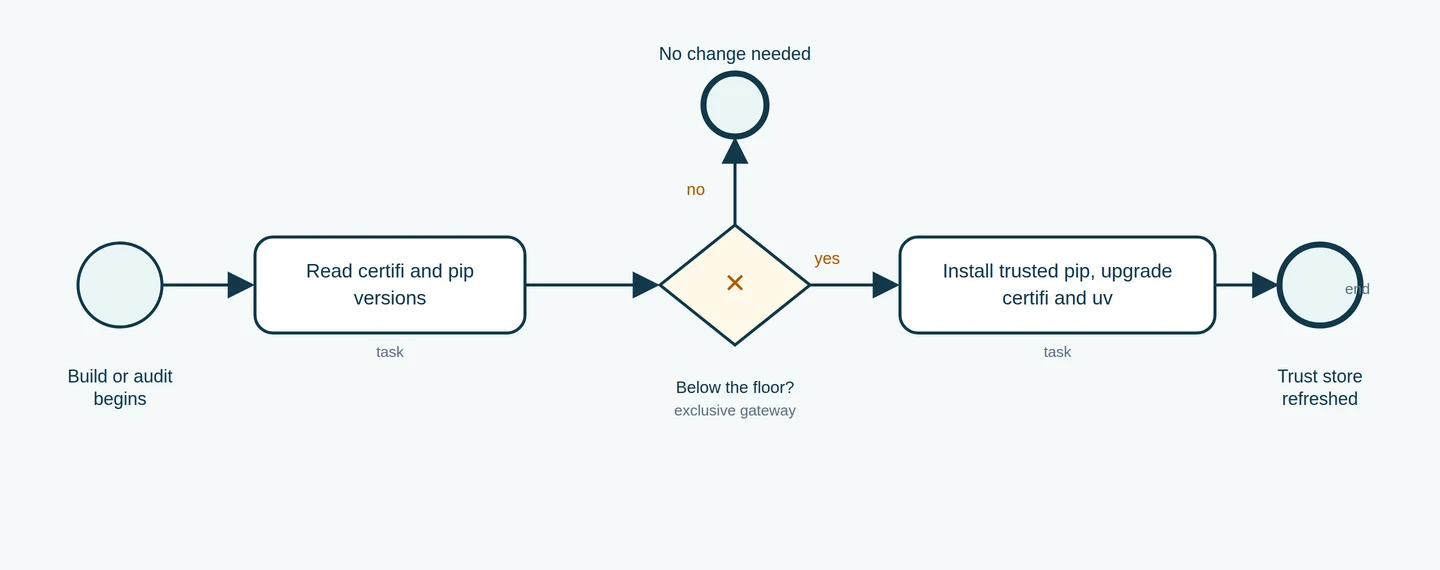 Figure 1: A BPMN workflow for auditing certificate bundles. The gateway checks whether certifi and pip are at or above the safe floor. If not, the upgrade path installs a trusted pip and updates certifi and uv. If at or above the floor, no change is needed at these checked package layers — but verify all applicable layers (system store, certifi, pip, uv) separately, and match against what your distribution and configuration actually use.
Run these checks in each active environment:
Check pip version:
python -m pip --version
Must report 26.2.2 or later. Specify the full venv path so you know which Python you are querying. Bare pip may point at a different interpreter.
Check certifi version:
python -m pip show certifi
Must be 2026.10.19 or later.
Check uv version:
uv --version
Must be 0.13.4 or later.
Inspect bundle locations:
import ssl, certifi
print("OpenSSL default CA file:", ssl.get_default_verify_paths().openssl_cafile)
print("certifi bundle:", certifi.where())
Path existence alone does not prove safety — a file can exist and still be stale. But if the certifi path points to a location your upgrade did not touch, that is a signal to investigate further.
How to spend the next thirty minutes
- Get a trusted pip and uv. Run the hash-bootstrap command and, for standalone uv,
UV_SYSTEM_CERTS=true uv self update. For package-manager-installed uv, usebrew upgrade uvorapt upgrade uv. - Walk every venv. Upgrade pip and certifi inside each one, using that venv's own Python. Update any lockfile or constraint that pins an old version.
- Audit your base images. Check each
FROM— pinned digest or mutable tag? — and whether a clean rebuild actually changed the bundled versions. Rebuild from a currently-correct image. - Verify inside the built image. Run the version checks from inside a running container, not just on your workstation.
Honest limits
This article was written against the Python advisory, the uv 0.13.4 and 0.13.5 release notes, the pip changelog, and the public disclosure page, checked live on October 26, 2026. No fleet-level testing was performed. Your operating system, container runtime, package manager, network configuration, and specific pinned versions all affect the real outcome.
Cleaning up a stale trust store in production is fiddly. Pip's vendored bundle cannot be disabled. uv carries its own embedded roots. The hash-bootstrap needs Python 3.10+. System stores, package certifi, and tool bundles are separate update targets with no automatic coordination. There is no single command that fixes all of them. The closest thing is the safe pip bootstrap and the UV_SYSTEM_CERTS flag, and you still need to thread both through every environment, image, and runner. The only defence is knowing which trust layer each component actually consults.
The transition checklist: verifying your handoff
Cleaning up a trust store compromise is less about a single command and more about verifying the handoff between your environment layers. As you move toward a verified baseline, use these specific record-keeping questions to confirm that your build isn't still leaning on a cached or pinned vulnerability.
First, check the source of your certificate bundle. If your application relies on the system trust store, has your base image or host OS received the security update for the CA-certificates package? Record the package version and the date it was applied. If you are using a Docker image with a pinned digest, remember that even a clean build command won't fetch updated certificates from the parent repository; the digest is an immutable bit-for-bit snapshot of the past. You must verify if your Dockerfile needs a fresh digest to break out of that stale state.
Finally, verify the delivery path of your libraries. When you upgrade certifi, you are updating a static bundle of certificates. If your deployment pipeline uses a local mirror or a cached wheelhouse, does that mirror actually contain the 2026.10.19 version of the package? A success message from your installer only means it found a version; you must confirm it found the corrected version by checking your lockfile or dependency manifests to ensure they pin the corrected package versions and match the trusted artifact metadata from your upstream index.
Sources & further reading
Checked 2026-10-26 · Story context: 2026-10-20
- eMudhra Intermediate CA Compromise — disclosure and proof bundle ↗ (2026-10-20)
- Python security advisory: eMudhra / emSign CA certificate incident ↗ (2026-10-20)
- pip changelog — 26.2.2 upgrades vendored certifi to 2026.10.19 ↗ (2026-10-20)
- uv 0.13.4 release — bundled root certificate update (GHSA-hq85-5cpj-mr62) ↗ (2026-10-20)
- uv changelog — 0.13.5 managed CPython builds and virtual environment notes ↗ (2026-10-21)
- Python 3.15.1 — first maintenance release, ships corrected pip and certifi ↗ (2026-10-21)
- certifi on PyPI — current release and upload date ↗ (2026-10-20)
- pip documentation — HTTPS certificates and system trust stores ↗
Lyra
ProgreTech Journal · Practical lessons, useful experiments and a healthy curiosity about what comes next.
Keep exploring
 Development
Offline reading works better when the reader chooses what stays
A practical PWA design guide for saved articles, complete issues, individual deletion, and honest storage status.
By Edwin Rodriguez · Oct 26, 2026 Development
A Python experiment you can recreate next week
An October look at uv, explicit dependencies, and the small environment record that makes AI tooling easier to debug.
By Edwin Rodriguez · Oct 21, 2026 Development
Nine Skills Shared Across Codex, Claude Code, and OpenClaw
This review covers sharing nine agent skills, detailing the strategic pivot from Last30Days to SECOP, and highlighting 100 newly verified Atlas signals for local deployment.
By Edwin Rodriguez · Oct 16, 2026